ISIS NSF

Introduction

ISIS is the routing protocol preferred for SD-Access (SDA). Roughly said, SDA is somewhat similar to routed access. We can think of fabric edge nodes as access switches when comparing them to our traditional flat networks. Many companies buy multiple switches and deploy them in stacks using Cisco StackWise technology. This has the usual benefits of stacking, namely collapsing all of the switches in the stack into just one management and control plane. We might see something similar to the below topology with SDA.
STP - Loop Guard

Spanning tree is the L2 control plane protocol we have to ensure a loop-free network. It does so by blocking redundant links.

Topology

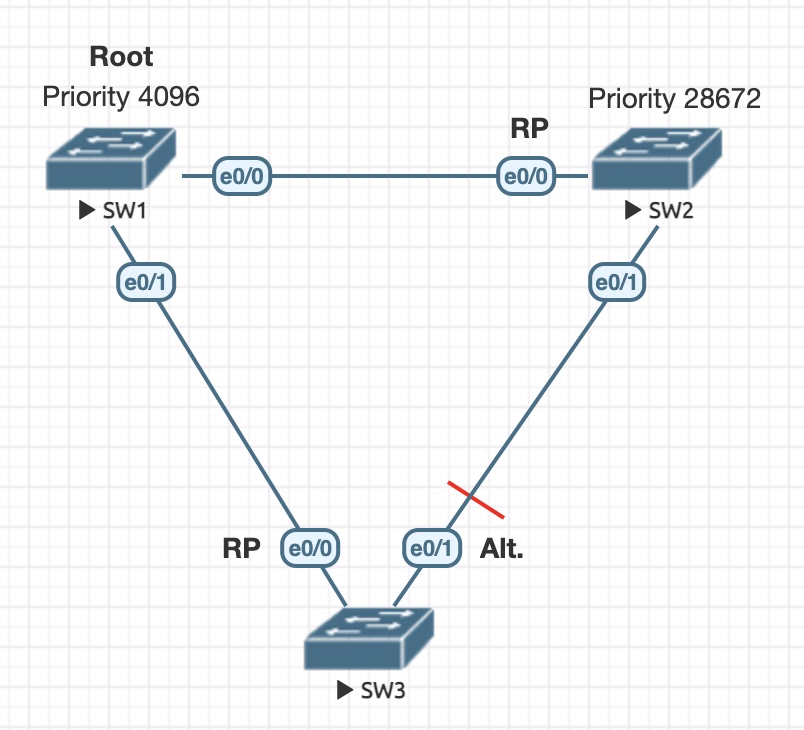
stp-loop-guard-topologys

Here, SW1 is the root switch with a priority of 4096. SW2 has been configured for root secondary. SW3 is default. Ultimately these configurations result in the above converged STP topology.

Initial configurations

SW1
SW1#sh run | sec span
spanning-tree mode pvst
spanning-tree loopguard default
spanning-tree extend system-id
spanning-tree vlan 1-4094 priority 4096
SW1#
SW2
SW2#sh run | sec span                      
spanning-tree mode pvst
spanning-tree loopguard default
spanning-tree extend system-id
spanning-tree vlan 1-4094 priority 28672
SW2#
SW3
SW3#sh run | sec span
spanning-tree mode pvst
spanning-tree loopguard default
spanning-tree extend system-id
SW3#

Loop Guard

Loop guard is an STP enhancement. It works by adding an extra check before letting a blocking port transition into forwarding state. If no BDPUs are received on the non-designated port, the port is moved into a loop inconsistent state.

SD-Access with Extended Nodes

Unfortunately not all Cisco platforms support SDA. Cisco has chosen these platforms to be extended by SDA to be able to offer both a desktop platform and IoT platforms:

  • 3560CX
  • IE 3300
  • IE 3400
  • IE 3400H
  • IE 4000 series
  • IE 5000 series
  • Catalyst Digital Building

NOTE! If you plan on using policy, meaning micro segmentation using SGTs, only IE 3400 and IE 3400H are supported as policy extended nodes!

Extended nodes must be connected to a single (or stacked) edge switch (excluding Catalyst 9200).

DNAC - SDA Transit with Direct Internet Access

Some companies are established with multiple sites in a small geographic area inter-connected with DWDM, dark fiber, or maybe MPLS. SDA transit could make sense to configure if the MTU (>= 1550 bytes) and latency (~10 ms) allows for it. One advantage of using SDA transit is the end-to-end VXLAN encapsulation which menas we have end-to-end policy for both macro (VN) and micro (SGT) segmentation when using SDA transit.

In this post I’ll go over how you could go about configuring direct internet access (DIA) using SDA transit. Along the way I’ll show how it works and why.

DNA Center - Discovery - What It Does To Your Devices

In this post I’m using DNAC version 1.3.3.3 for demonstrate what happens when you discover a switch using DNAC.

Previously I’ve written similar posts:

DNA Center - PnP - What It Does To Your Devices DNA Center - Provision - What It Does To Your Devices

Test Case

One simple test case is all we need to see what DNAC does:

  • Manually configure a Cat9300 switch
  • Add the switch to DNAC using a discovery job

Topology

The below topology is used for this post:

DNA Center - Provision - What It Does To Your Devices

In this post I’m using DNAC version 1.3.3.3 to demonstrate what DNAC does to your device when configuring the network settings in DNAC.

Previously I’ve written similar posts:

DNA Center - PnP - What It Does To Your Devices DNA Center - Discovery - What It Does To Your Devices

Test Case

One simple test case is all we need to see what DNAC does:

  • Manually configure a Catalyst 9300 switch
  • Add the switch to DNAC manually via inventory

Topology

The below topology is used for this post:

DNA Center - PnP - What It Does To Your Devices

DNA Center is a management platform that enables users to bring automation to their network. It also offers an assurance feature that aids in troubleshooting and ensuring the network runs as it should using 360 views with health status of network, client, and apps. The latter will not be in focus for this post. Rather a closer look at what DNAC actually does to your devices in regards to configuration will be revealed.

DNA Center Password Recovery

NOTE! This guide was made before Cisco had an official document describing how to do password recovery for DNAC. It was made on a very old version of DNAC. Probably 1.3.x and is now considered obsolete. Check out the official way of doing password recovery now documented here

DNAC is very cumbersome and time consuming to install. It can easily take an entire day to do the initial installation and deployment of packages. At the time of writing, Cisco has not published their documentation of how to perform password recovery of DNAC. If you forget or lose your maglev or admin password, your only option is to call your Cisco partner and hope they have a how-to, or create a TAC case. This guide aims to avoid these support cases by providing you a how-to of recovering the passwords yourself, if needed.

Cisco PnP - Revisited

I’ve gone over the Cisco PnP feature before. This time I will revisit the feature with focus on other areas. Specifically these cases will be discussed:

  • PnP with Non-Vlan1 (conditionally)
  • Re-use DHCP-assigned IP address on another interface
  • PnP with an EtherChannel

PnP With Non-Vlan1 (Conditionally)

I briefly discussed this in my original post, but I ran in to a case where I actually wanted both a startup-vlan and the default of Vlan1.

MPLS QoS

This post will look at how QoS works in an MPLS environment. The default behaviour of MPLS QoS is shown. Next, I’ll explain and demontrate the three MPLS QoS DiffServ Models - Uniform, Pipe, and Short Pipe. As usual expect both configuration examples and wireshark captures. Do not expect fancy QoS policies as this post’s goal is to reveal the concepts of the technology rather than focus on QoS in itself. I will not discuss how policing, shaping, or queuing works, for example.