CCIE SP

MPLS VPNs vs. VRF-lite

Segmentation is becoming more and more critical as part of securing a network. In this article I will compare MPLS VPNs to VRF-lite. Both are ways to segment a network logically at L3 using VNs (VRFs).

Many years ago when I was new to networking technologies I had some fear of “MPLS”. I was biased and I though of MPLS as something insanely complicated that only service providers used in their network to magically inter-connect large companies. Later when I started learning about MPLS and its operations I realized that I was prejudiced only due to fear of the unknown.
MPLS QoS

This post will look at how QoS works in an MPLS environment. The default behaviour of MPLS QoS is shown. Next, I’ll explain and demontrate the three MPLS QoS DiffServ Models - Uniform, Pipe, and Short Pipe. As usual expect both configuration examples and wireshark captures. Do not expect fancy QoS policies as this post’s goal is to reveal the concepts of the technology rather than focus on QoS in itself. I will not discuss how policing, shaping, or queuing works, for example.

Segment Routing Introduction

Segment Routing (SR) is also known as SPRING (Source Packet Routing in Networking). Two flavours of SR exist:

  • SR with MPLS
  • SRv6 (IPv6 Segment Routing Header (SRH))

I will only cover SR with MPLS in this post.

If you know MPLS it will be fairly easy to learn about SR. If we quickly look at the name of the feature and break it down, it will make sense what its all about.

H-VPLS

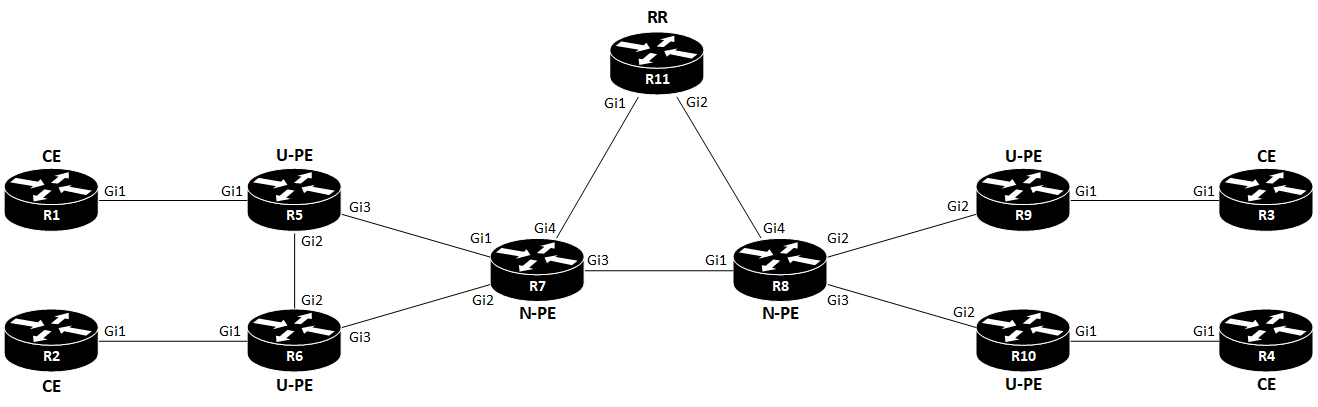
I’ll use the following topology:

topology

Terms

TermDescription
CECustomer Edge
PEProvider Edge
U-PEUser Provider Edge
N-PENetwork Provider Edge
UNIUser Network Interface
VFIVirtual Forwarding Instance

VFI is also called VSI (Virtual Switching Instance). Cisco uses the term VFI.

Introduction

VPLS is an MEF E-LAN service (MP2MP).

H-VPLS (Hierarchical Virtual Private LAN Service) is a way to scale VPLS. The issue with VPLS is that it requires a full mesh of PWs (pseudowires) between PEs. This doesn’t scale. In order to address this shortcoming, two types of PEs exist with H-VPLS: U-PE and N-PE. The User facing PE (U-PE) is the router connecting to the CE and the N-PE. Network facing PE peers with U-PEs and N-PEs. The U-PE only need to have a PW to the N-PE. But the N-PE still needs a full mesh of PWs to all other N-PEs, and also a PW to each U-PE.

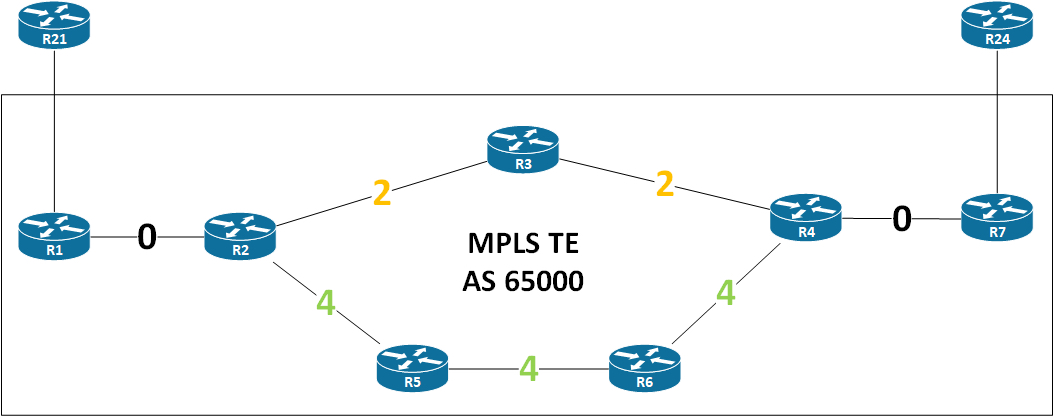
MPLS TE - Affinity

I’ll use the following topology:

topology

The basic idea about MPLS TE affinity is to add an attribute to a link and be able to include or exclude this link during path calculation. The concept is also known as link coloring.

Affinity is configured on links using the mpls traffic-eng attribute-flags <0x0-0xFFFFFFFF> interface command. The values is expressed in a 32-bit hexadecimal number. By default a link has the number 0 (or 0x0).

Unified MPLS

Also known as seamless MPLS, or hierarchical MPLS. It’s a way to scale to a very large network with multiple IGP domains. Let’s get started exploring this feature.

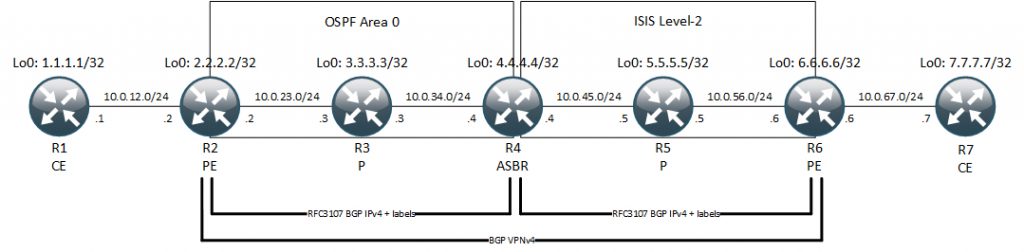
I’ll use the below topology as we go along.

Unified MPLS Topology

What’s new here is the RFC 3107 BGP IPv4 + label and the fact that we have multiple IGP domains. In this topology we have both an OSPF domain to the left between R2-R3-R4. Also to the right we have ISIS between R4-R5-R6.

Multicast VPN Extranet

This post talks about how you can do inter-VRF multicast using BGP VPNv4 multicast (SAFI 129).

You might have seen this guide on Cisco.com
Configuring Multicast VPN Extranet Support

They suggest leaking unicast routes between VRFs which isn’t required for this to work.

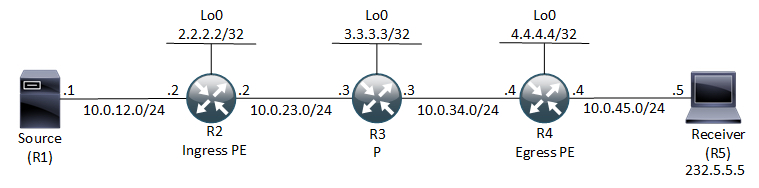
I’m using this topology to go through the configuration:

LDP

Label Distribution Protocol (LDP) is one of the protocols that can be used for MPLS to distribute labels. Other protocols are RSVP-TE, BGP, and IGPs (ISIS and OSPF). This short post addresses LDP and how it works.

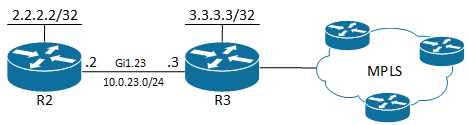
I’m using two routers to talk about LDP in this post. R2 and R3 that are connected like this:

Configuration

LDP is very simple to configure. It is basically just one command needed.

mVPN – Profile 0 aka. “Rosen Draft”

mVPN Profile 0 is the original way of doing mVPN when we had no extensions to LDP. This means we need PIM in the underlay – the SP core. Specifically the profile is called:

Profile 0 Default MDT - GRE - PIM C-mcast Signaling

Topology

I’ll use the following topology to go through and explain the concepts and workings of Rosen Draft with Data MDT.