Disable StackWise Virtual
Things change. Especially in the realm of infrastructure. We tend to continuously focus on optimizing and redesigning our networks to support the business goals. Or you might simple need to repurpose hardware. Whatever the reason might be we need to know the “how” and “what” of such changes. Take StackWise Virtual, for example. If we want to break up the StackWise Virtual switch pair, you can find this official documentation:
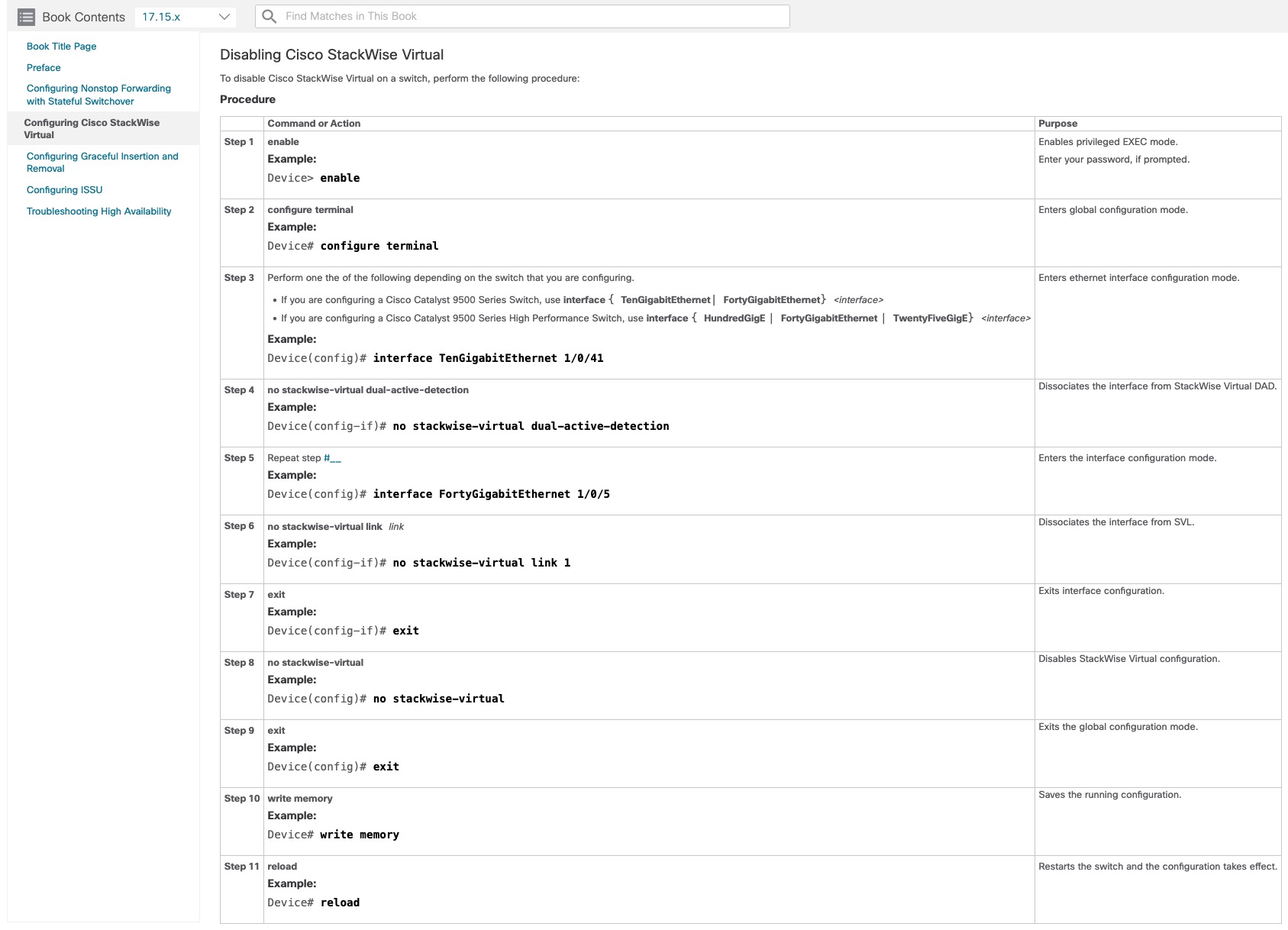
Okay. Now we know the “how” part of the equation. This leaves us with at least one question:
- What happens when we do it?
Unfortunately, at the time of writing this part cannot be found in the official docs. I was lucky to perform this procedure a couple of days ago. Here is what happens:
Switch(config)#interface TwentyFiveGigE1/0/2
Switch(config-if)# no stackwise-virtual dual-active-detection
WARNING: Stackwise Virtual Dual Active Detection Configuration for TwentyFiveGigE1/0/2 will be removed on reboot.

Switch(config-if)#interface TwentyFiveGigE1/0/47
Switch(config-if)# no stackwise-virtual dual-active-detection
WARNING: Stackwise Virtual Dual Active Detection Configuration for TwentyFiveGigE1/0/47 will be removed on reboot.

Switch(config-if)#interface TwentyFiveGigE2/0/2
Switch(config-if)# no stackwise-virtual dual-active-detection
WARNING: Stackwise Virtual Dual Active Detection Configuration for TwentyFiveGigE2/0/2 will be removed on reboot.

Switch(config-if)#interface TwentyFiveGigE2/0/47
Switch(config-if)# no stackwise-virtual dual-active-detection
WARNING: Stackwise Virtual Dual Active Detection Configuration for TwentyFiveGigE2/0/47 will be removed on reboot.

Switch(config-if)#interface TwentyFiveGigE1/0/1
Switch(config-if)# no stackwise-virtual link 1
WARNING: SVL configuration will be ignored  on lower (1G) speed.
WARNING: Stackwise Virtual Configuration for TwentyFiveGigE1/0/1 will be removed on reboot.
Switch(config-if)#interface TwentyFiveGigE1/0/48
Switch(config-if)# no stackwise-virtual link 1
WARNING: SVL configuration will be ignored  on lower (1G) speed.
WARNING: Stackwise Virtual Configuration for TwentyFiveGigE1/0/48 will be removed on reboot.
Switch(config-if)#interface TwentyFiveGigE2/0/1
Switch(config-if)# no stackwise-virtual link 1
WARNING: SVL configuration will be ignored  on lower (1G) speed.
WARNING: Stackwise Virtual Configuration for TwentyFiveGigE2/0/1 will be removed on reboot.
Switch(config-if)#interface TwentyFiveGigE2/0/48
Switch(config-if)# no stackwise-virtual link 1
WARNING: SVL configuration will be ignored  on lower (1G) speed.
WARNING: Stackwise Virtual Configuration for TwentyFiveGigE2/0/48 will be removed on reboot.
Switch(config-if)#exit
Switch(config)#no stackwise-virtual
Please reload the switch to disable Stackwise Virtual functionality
Switch(config)#end
Switch#wr
Building configuration...
[OK]!
Switch#reload
When the switch boots up, you’ll see this on the console:
<snip>
switch 2 provision c9500-48y4c
       ^
% Invalid input detected at '^' marker.

 mode sso
  ^
% Invalid input detected at '^' marker.

interface TwentyFiveGigE2/0/1
           ^
% Invalid input detected at '^' marker.

 description < DAD >
   ^
% Invalid input detected at '^' marker.

interface TwentyFiveGigE2/0/2
           ^
% Invalid input detected at '^' marker.

 description < DAD >
   ^
% Invalid input detected at '^' marker.

interface TwentyFiveGigE2/0/3
           ^
% Invalid input detected at '^' marker.
<snip>
Although we disabled StackWise Virtual the configuration in startup-configuration remained (except for the specific StackWise Virtual part we removed a moment ago). The switch tries to configure interfaces from switch 2 which is no longer there. I guess this is one way to remove the configuration, though not pretty.
Be aware of duplicate configuration for the previous switch 2. Both switches will have the same configuration even though we disabled StackWise Virtual. You will probably need to console into the previous switch 2 to re-gain IP management access.
That’s it for this post. I hope you found it useful.